WiseCord
Discord Member Management: A Complete Guide

Part of the Discord member list guide
This article is one chapter. The full picture, with the product walkthrough and the comparison table, is on the Discord member list page.
Discord member management is the practice of organizing, tracking, and moderating the people in your server using roles, permissions, onboarding, and monitoring tools. Done well, it combines Discord's built-in systems with clear rules and, where useful, external tools that give you records of who joins and leaves. This guide is for community operators and moderators who want a healthy, well-run server that scales.
Start With Roles and the Permission Hierarchy
Everything in Discord member management flows from roles. A role is a bundle of permissions plus an optional color and name, and every member can hold several at once. What makes roles powerful (and occasionally confusing) is that they are ranked. The order in your Server Settings > Roles list is the order of authority: a role near the top can moderate, edit, and out-rank every role beneath it.
Two rules follow from that hierarchy, and most permission mistakes come from ignoring them:
- Members can only act on people below them. A moderator role placed under a "Booster" role can't kick or ban boosters, no matter what permissions the mod role has.
- Permissions are additive. Discord grants a permission if any of a member's roles allow it. You can't take a permission back with a second role unless you use a channel-level override.
A clean setup usually separates permission roles (Admin, Mod, Helper) from cosmetic roles (color roles, pronoun roles, notification opt-ins). Keeping them apart means you can hand out a bright color without accidentally handing out the ability to delete messages.
Build Permissions From the Bottom Up
The safest way to configure a server is to start restrictive and grant access deliberately:
- Strip @everyone down to the basics — read messages, send messages in general channels, connect to voice. Leave off anything sensitive like Mention @everyone, Manage Messages, or Kick Members.
- Add permissions incrementally through named roles rather than loosening the base role.
- Use channel-specific overrides for exceptions — for example, an "Announcements" channel where only staff can post but everyone can read.
- Audit your roles on a schedule. Permission creep is real: a temporary grant from six months ago is how servers get accidentally nuked.
Onboarding and Verification
First impressions decide whether a new member sticks around or leaves in thirty seconds. Discord gives you several native tools to shape that first minute, and using them well is a core part of member management.
- Verification levels (Server Settings > Safety Setup) gate how quickly new accounts can talk. Setting a medium or high level forces accounts to be registered or verified for a period before posting, which filters out a lot of throwaway spam accounts.
- Rules Screening makes members explicitly agree to your rules before they can participate — useful as both a filter and a legal-ish acknowledgment.
- Onboarding (available once you enable Community) lets you route new members to channels based on interests, so a trading server can send signal-seekers straight to the alerts channel.
- Verification bots add a reaction-based or CAPTCHA gate that stops raid bots before they reach your channels.
Pair these with a short, scannable rules channel and a single "start here" message. Long walls of text get ignored; three to five clear rules do not.
Moderation: Proactive and Reactive
Good moderation is mostly invisible because it prevents problems rather than cleaning them up. Split your effort into two buckets.
Proactive Tools
- AutoMod is Discord's native, no-bot-required filter. It can block banned keywords, spam mentions, and known harmful links automatically.
- Slow mode caps how often members can post in a busy channel, which defuses pile-ons and spam without any manual work.
- Verification levels and Rules Screening (above) keep the wrong accounts out in the first place.
Reactive Tools
- Use the Audit Log (Server Settings > Audit Log) to see who changed what — role edits, kicks, bans, channel deletions. It's your accountability record for the staff team.
- Apply graduated punishments: warn, then time out (mute), then kick, then ban. Jumping straight to bans burns goodwill and hides patterns.
- Keep a private staff channel for documenting actions and a simple appeals path so mistakes can be reversed.
Keeping Records of Who's Actually in Your Server
Roles and moderation handle the inside of your server, but management also means knowing who your members are over time — for backups, for outreach, or simply to notice when growth stalls. This is where Discord's native tooling gets thin, especially for operators of paid communities who need real records.
Discord's member list only lazily loads the members your client can currently see (online and recently active ones surface first), so scrolling and copying by hand is both tedious and incomplete. There are better options depending on what you need:
| Approach | What it does well | Limitations |
|---|---|---|
| Manual copy-paste | Free, no setup | Tedious, error-prone, only captures visible members, no structured file |
| Discord Server Insights | Native growth, retention, and activity trends | Community servers only; aggregate stats, not a per-member export |
| Logging / join-log bots | Real-time join/leave entries in a channel | Needs a bot with permissions; data stays inside Discord, hard to export |
| WiseCord (Android) | Exports member lists to Excel/CSV, push join alerts, 24/7 cloud monitoring | desktop and Android; exports members visible to your account; large servers take longer due to safety rate limiting |
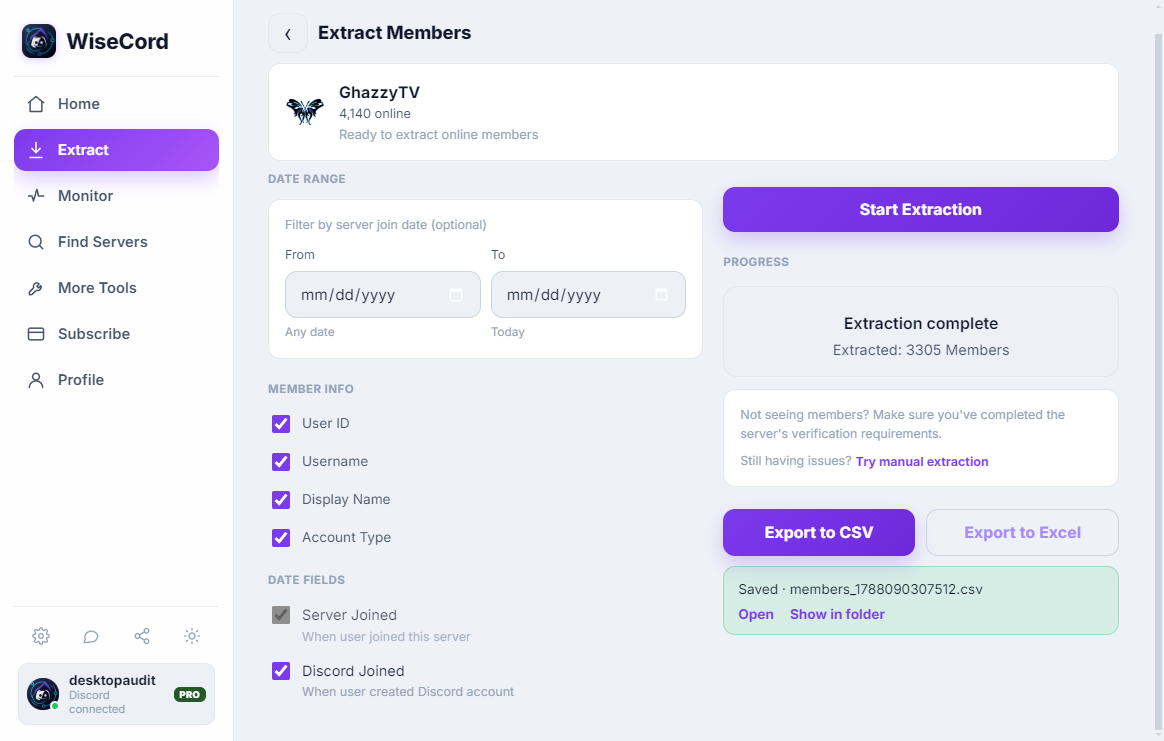
WiseCord sits in that last row for operators who want a portable record rather than a dashboard. It pulls the member list your account can see and exports it to a spreadsheet with the fields that matter — username, user ID, nickname, roles, join date, and account-creation date. That last field is quietly useful: a cluster of brand-new accounts joining at once is a classic raid signal. Our walkthrough on exporting a Discord member list to Excel covers the full flow.
Be clear-eyed about what these tools do and don't do. WiseCord gives you a snapshot of who is in the server and a real-time alert when someone joins — it does not measure message counts or per-member engagement. For activity depth you'd lean on Discord's own Insights or a stats bot, which we compare in our guide to tracking server activity.
Real-Time Awareness as You Grow
Managing a small server is hands-on work you can do from the member list. Past a few hundred members, you can't watch the door yourself. Real-time join alerts close that gap: instead of discovering a raid or a wave of signups hours later, you get a push notification the moment someone joins a monitored server. For operators running signal groups or coaching communities across time zones, WiseCord's real-time alerts and optional 24/7 cloud monitoring keep tracking joins even when the app is closed.
Scale Your Management to Your Server Size
The right amount of structure depends on how many people you're managing.
Small Servers (under 100 members)
Keep it personal. A couple of roles, a rules channel, and AutoMod are plenty. You know most members by name, so heavy tooling just adds friction.
Medium Servers (100–1,000 members)
Now you need a moderation team, a clear role hierarchy, verification, and a logging habit. This is the stage where knowing exactly who joined and when starts to matter — and where join alerts and periodic member exports save real time.
Large Servers (1,000+ members)
At scale, management becomes a small operation: layered moderation, AutoMod plus stats bots, Community features, and reliable monitoring. Manual member tracking is no longer viable, so a repeatable export-and-alert workflow becomes part of your routine. Community managers juggling several servers should read our notes on Discord management for community managers.
Frequently Asked Questions
Is exporting a Discord member list against the Terms of Service?
Discord's terms restrict automated access to its API (bots and unauthorized scrapers). WiseCord is designed to work within normal Discord client behavior and includes a deliberately unhurried pace for account safety, but it is a third-party tool and not endorsed by Discord. Only export data you have a legitimate reason to access as a member of the server, and handle any member data responsibly — treat usernames and IDs the way you'd want yours treated.
Will using a third-party management tool get my account banned?
The main risk with any automation is triggering Discord's rate limits by behaving unlike a normal user. WiseCord addresses this with a deliberately unhurried pace so requests pace themselves rather than hammering Discord. The trade-off is honest: large servers take longer to export because the app deliberately slows down. If you want a deeper look at staying safe, see our account safety tips.
What member data can I actually see and export?
You can only work with members your account can see — Discord surfaces online and recently active members first, and very large servers load progressively. When you export, WiseCord captures username, user ID, nickname, roles, join date, and account-creation date. It does not expose private information like email addresses or phone numbers, which Discord never shares.
Do I need Discord's Community features to manage members?
No. Roles, permissions, verification levels, AutoMod, and the audit log all work on any server. Enabling Community unlocks extras — Onboarding, Server Insights, and Rules Screening — which are worth turning on once you pass a few hundred members and want native growth stats.
Is WiseCord free, and is it on the App Store?
WiseCord runs natively on Windows and macOS, with an Android build installed via direct APK download (a VirusTotal scan is linked on the download page), not the Play Store, and there is currently no iOS version. It offers a free trial, with paid plans starting at $16/month; 24/7 cloud monitoring and message search are Pro features. See pricing for the current plans.
What's the difference between join alerts and cloud monitoring?
Join alerts notify you when someone joins a server you're watching. Cloud monitoring (a Pro feature) keeps that tracking running on WiseCord's servers, so joins are still recorded even when the app is closed or your phone is off — useful for overnight coverage and multiple servers at once.
Practical Tips for Better Member Management
- Separate permission roles from cosmetic roles so a color change never becomes a permission change.
- Audit your role list quarterly and revoke any temporary grants that outlived their purpose.
- Turn on AutoMod and a sensible verification level early — they cost nothing and prevent most spam.
- Export a member snapshot periodically so you have a record if roles or accounts change, or if you need to rebuild after a raid.
- Watch account-creation dates in your exports — a burst of day-old accounts is an early raid warning.
- Set up join alerts before you need them, especially for paid communities where a new member is a new customer.
Effective member management is the combination of good systems, clear rules, and real visibility into who's in your community. Master the native tools first, then add lightweight tracking where Discord leaves gaps. Ready to keep better records? Download WiseCord and start with a member export and real-time join alerts.