WiseCord
Discord Member Scraper Tools Compared (2026)

Part of the Discord scraper guide
This article is one chapter. The full picture, with the product walkthrough and the comparison table, is on the Discord scraper page.
The best Discord member scraper for most community operators is a purpose-built mobile app like WiseCord, because it exports the members visible to your account to Excel or CSV with one tap and applies a deliberately unhurried pace to protect your account. Manual copy-paste, browser extensions, and GitHub bot scripts also exist, but they trade convenience or safety. This guide compares each method honestly so you can pick the right one for your server and your risk tolerance.
It is written for paid-community operators, marketers, and community managers who need a member list for backup, analytics, or outreach and want to understand the trade-offs before installing anything.
What "scraping" Discord members actually means
Discord does not offer a native "download my member list" button for regular users. Every extraction method works around that gap by reading the members your account can already see, then structuring that data into a file. A typical export contains the username, user ID, server nickname, roles, join date, and account-creation date. The key limitation that applies to every method below is the same: you can only collect members that Discord actually renders for your account. Discord loads online and recently active members first in large servers, so a full snapshot of a huge community takes time and repeated scrolling regardless of the tool.
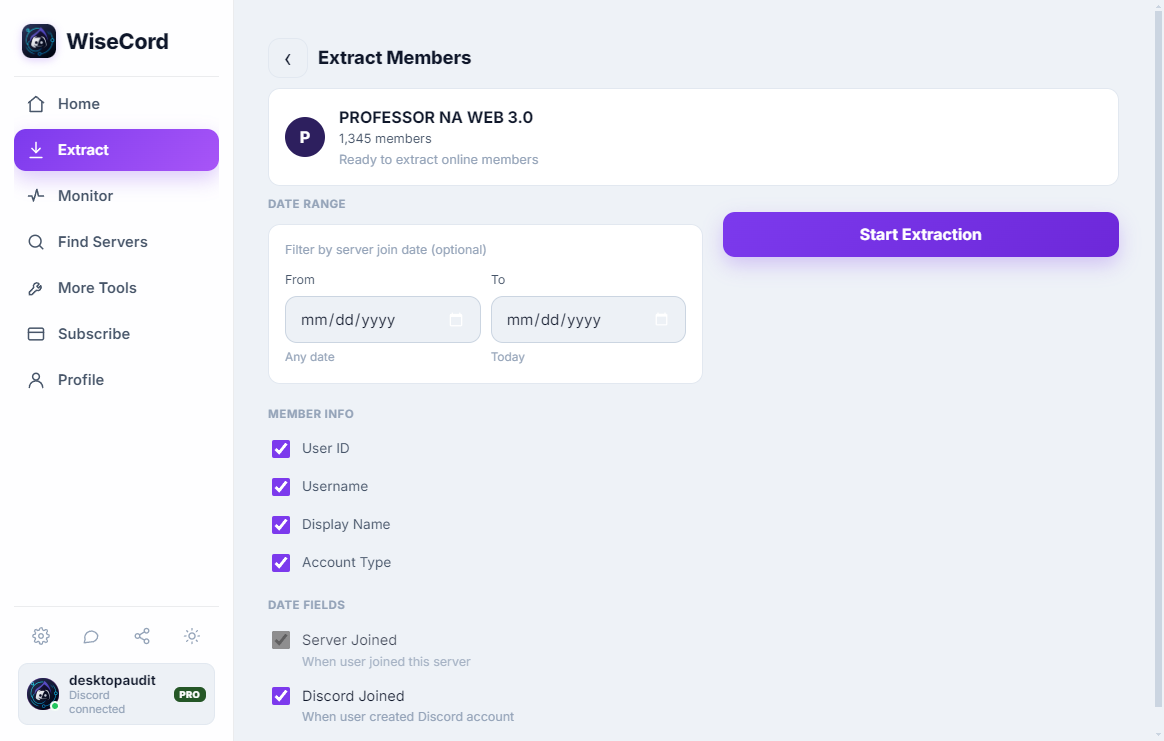
Understanding that constraint upfront saves disappointment. No tool "unlocks" hidden members. The difference between methods is how much manual effort they require, how safely they pace their requests, and how usable the output is. If you want a deeper walkthrough of the end result, our guide on how to export a Discord member list to Excel covers the export step in detail.
Discord member scraper comparison table
Here is how the five common approaches stack up on the factors that matter most: ease of use, output quality, account safety, and cost.
| Method | Ease of use | Output | Account safety | Best for |
|---|---|---|---|---|
| WiseCord (mobile app) | Very easy, no setup | Structured Excel/CSV, copy usernames | a deliberately unhurried pace; works within normal client behavior | Operators wanting fast, clean exports on Android |
| Manual copy-paste | Tedious for anything but tiny servers | Raw text you must clean by hand | Safest (no automation), but slow | A handful of members or a one-off |
| Browser extensions | Moderate; depends on the extension | Varies; often messy | Higher risk; many are abandoned or unvetted | Desktop users comfortable vetting the code |
| GitHub scripts / bots | Technical; command line and tokens | Highly customizable | Highest risk; bots explicitly break Discord ToS | Developers who accept the risk |
| Discord bots (official API) | Moderate setup; needs admin | Complete list on servers you own | Safe and sanctioned when done right | Server owners with admin access |
The five methods in depth
1. Mobile apps like WiseCord
A dedicated app handles the tedious parts for you. WiseCord connects through your own Discord account, walks the member list the same way the client does, and packages the result into an Excel (.xlsx) or CSV file with columns for username, user ID, nickname, roles, join date, and account-creation date. You can also one-tap copy usernames if you just need a plain list. The main appeal is that there is no technical setup and no tokens to paste anywhere risky, and the app paces its own requests to stay within normal client behavior.
The honest trade-offs: WiseCord is desktop and Android, and like every method it can only reach members visible to your account, so a very large server takes longer because the app deliberately slows down rather than hammering Discord. If a clean spreadsheet you can hand to a teammate is the goal, this is usually the least-friction option. You can download WiseCord and try it on a small server first to see the output format.
2. Manual copy-paste
The lowest-tech method is to open the member sidebar, select names, and paste them into a spreadsheet. It uses no automation at all, which makes it the safest possible approach from an account-standing perspective. The catch is obvious: it is painfully slow past a few dozen members, Discord's virtualized list only renders what is on screen, and you end up with raw text that needs heavy cleanup to become useful data (no user IDs, no join dates, no roles unless you chase each profile individually). For a tiny server or a quick one-off it is fine; for anything recurring it is not realistic.
3. Browser extensions
Several browser extensions promise to scrape the Discord web client. Quality varies enormously. Some are well maintained; many are abandoned, closed-source, or request broad permissions that put your session at risk. Because they run inside your logged-in browser, a poorly written or malicious extension has access to your account, so vetting matters more here than anywhere else. Output quality is inconsistent too — some produce clean CSVs, others dump unstructured text. If you go this route, read the source, check when it was last updated, and never install one that asks for your password or token.
4. GitHub scripts and bots
Open-source scrapers on GitHub give developers the most control. They can be configured to pull specific fields and run on a schedule. The serious problem is that most of these tools operate as bots — they automate a normal user account, which Discord's Terms of Service explicitly prohibit. That is the single biggest ban risk of any method on this list. They also require comfort with the command line, dependency management, and handling account tokens, which is itself a security hazard if a token leaks. Powerful, but only appropriate for people who fully understand and accept the risk.
5. Discord bots using the official API
If you own the server, the sanctioned path is a bot with the Server Members Intent enabled. A bot can read the complete member list — not just the currently visible ones — because it uses Discord's official gateway rather than scraping the client. This is the safest method that returns a full roster, but it only works on servers where you can add and authorize a bot, and it requires setting up an application in the Discord developer portal. For server owners doing backups or migrations, this is the gold standard; for anyone extracting from a server they don't administer, it simply isn't available.
How to choose
- You run the server: a Discord bot on the official API gives you the cleanest, most complete data with zero less-travelled path.
- You're a member (not owner) and want a fast, tidy export: a mobile app like WiseCord is the practical pick, with rate limiting handling account safety for you.
- You need a handful of names once: manual copy-paste costs nothing and risks nothing.
- You're a developer who accepts bot risk: a GitHub script offers maximum control — just know it violates Discord's ToS.
- Avoid unvetted browser extensions and any tool that asks for your account token or password.
Safety best practices
Whichever method you choose, a few habits protect both your account and the people in your export:
- Respect rate limits. Tools that pace their requests — like WiseCord's built-in limiting — are far less likely to trigger account friction than scripts that request as fast as possible. Our account safety tips go deeper on staying within safe patterns.
- Extract during quieter hours. Pulling a large list when the server is calmer means fewer competing requests and a smoother run.
- Handle the data responsibly. A member export contains real people's IDs and join history. Store it securely, use it for legitimate purposes, and don't redistribute it. See our member extraction best practices for a fuller checklist.
- Never paste your token into unknown software. Any tool that demands your Discord token or password is a red flag.
Frequently asked questions
Can scraping Discord members get my account banned?
It depends on the method. Manual copy-paste and official Discord bots carry essentially no ban risk. Bot scripts from GitHub carry the highest risk because they explicitly violate Discord's Terms of Service. Purpose-built apps sit in a less-travelled path but reduce risk by applying rate limiting and working within normal client behavior rather than flooding Discord with requests. Extracting slowly and in moderation is always safer than aggressive automation.
What member data can I actually export?
Most tools capture username, user ID, server nickname, roles, join date, and account-creation date. The important caveat is that you can only export members your account can see. Discord loads online and recently active members first in large servers, so a complete snapshot of a big community requires more time and, in some tools, repeated passes.
Is a free tool enough, or do I need a paid one?
For a one-time list of a small server, manual copy-paste is free and sufficient. For recurring exports, clean spreadsheet formatting, and larger servers, a paid app pays for itself in saved time. WiseCord includes a free trial and paid plans starting at $16/mo, so you can test the export on a small server before committing — see the pricing page for the current tiers.
Do I need a computer, or can I do this on my phone?
Browser extensions and GitHub scripts are desktop-oriented. WiseCord runs on Android, which means you can export a member list directly from your phone without a laptop or command line. It is distributed as a direct APK download rather than through the Play Store, and a VirusTotal scan is linked on the download page for transparency.
Is scraping Discord members against the rules?
Discord's Terms of Service prohibit bots (automating a user account). Using the official bot API on a server you control is sanctioned. Reading data your account can already see is a greyer area. The responsible approach is to extract only from servers where you have a legitimate reason, pace your requests, and handle the resulting data with care. This article is not legal advice — review Discord's current terms for your situation.
What's the fastest way to get a clean spreadsheet?
A dedicated app is fastest for a formatted result, because it structures the fields into columns and exports to Excel or CSV automatically instead of leaving you to clean raw text. If you plan to reuse the workflow regularly, our guide to Excel export automation shows how to fit exports into a repeatable process.
The bottom line
There is no single "best" Discord member scraper — there is a best fit for your role and risk tolerance. Server owners should use the official bot API for complete, sanctioned data. Members who want a quick, clean export without technical setup are best served by a mobile app like WiseCord, which balances ease of use with account-conscious rate limiting. Manual copy-paste remains the safe fallback for tiny jobs, while bot scripts and unvetted extensions carry the most risk. Match the tool to the job, extract responsibly, and treat the exported data with the same care you'd want for your own.