WiseCord
Member Extraction Best Practices

Part of the Discord member list guide
This article is one chapter. The full picture, with the product walkthrough and the comparison table, is on the Discord member list page.
The best practices for member extraction come down to four things: only pull data from servers you have a legitimate reason to analyze, respect Discord's rate limits instead of hammering the API, understand that you can only extract members your own account can see, and use the exported list for analytics and outreach rather than spam. Do those four things and extraction stays safe, useful, and defensible. This guide is for Discord community operators and managers who want reliable member data without putting their account at risk.
What member extraction actually is (and isn't)
Member extraction is the process of reading the member list of a Discord server you belong to and saving it as structured data you can work with outside Discord. With WiseCord, that means exporting to Excel (.xlsx) or CSV with fields like username, user ID, nickname, roles, join date, and account-creation date, plus a one-tap option to copy usernames.
It is not a magic hose that pulls every human who has ever touched a server. This is the single most important thing to understand before you start. Discord does not hand any client the full membership on demand. Your Discord app requests members as you scroll, and it prioritizes people who are online or recently active. So any tool built on the normal client behavior, WiseCord included, extracts the members visible to your account, not a hidden master roster. Setting that expectation up front saves a lot of confusion when the exported count is smaller than the "X members" badge at the top of the server.
Why the "visible members" limit exists
Discord deliberately paginates member lists. For a small server, your client can load essentially everyone in a single pass because the whole list fits in a few requests. For a server with tens of thousands of members, the client streams them in chunks and leans heavily toward online and recently-active users, because loading every offline account at once would be enormous and slow. This is not a WiseCord restriction; it is how the platform is designed, and it is the same reason the desktop and web apps feel "laggy" when you scroll a huge member sidebar.
The practical takeaway: completeness is a function of visibility and time, not of paying for a bigger button. You get a more complete export when more members are online and when you let the process run long enough to page through them at a safe rate.
Legitimate use cases
Member data is genuinely valuable when you own or help run the community it comes from. Common, defensible reasons operators extract member lists:
- Community analytics and reporting — measuring growth, role distribution, and how account age correlates with retention.
- Backups of your own community — keeping an offline record of who your members are in case of a raid, ban wave, or accidental server loss.
- Segmented outreach — building role-based lists (e.g. paid subscribers vs. free members) for announcements people actually opted into.
- Moderation and safety audits — spotting clusters of brand-new accounts that joined in the same window, a classic raid/bot signal you can read straight off the account-creation-date column.
- Event planning — knowing your active headcount before you schedule a launch, AMA, or drop.
If you run a paid community (crypto signals, sports picks, coaching, forex, NFT), an exported roster is also the backbone of reconciling who's actually in your server against who's paying. Pair it with solid member management habits and the spreadsheet becomes an operations tool, not just a data dump.
How the extraction methods compare
There is more than one way to get a member list out of Discord, and they are not equally safe. Manual copy-paste is tedious but low-risk. Browser extensions and public "scraper" scripts from code-sharing sites are where accounts get into trouble, because many of them drive your account like an automated bot (a bot), which is squarely against Discord's rules. Here's an honest comparison:
| Method | Speed & effort | Output | Account risk |
|---|---|---|---|
| Manual copy-paste | Very slow; painful past a few hundred members | Plain text, no roles or IDs unless you add them by hand | Low |
| Browser scraper extensions | Fast, but desktop-only and often abandoned | Varies; formatting is inconsistent | High — many act as bots |
| GitHub scripts / bots | Fast if you can run code; setup is technical | Flexible but raw | Very high — account-based automation is against ToS |
| Discord bot in your own server | Fast, but only works where you can add a bot | Clean, official API data | Low, but needs admin + a "server members" intent |
| WiseCord (Android) | Fast on your phone; large servers page in over time | Structured Excel/CSV with roles, IDs, dates | Lower — a deliberately unhurried pace, works within normal client behavior |
The honest summary: an official Discord bot is the cleanest route when you own the server and can add one, because it uses the official API. WiseCord's advantage is that it works from your phone in servers where you're a normal member, structures the output for you, and paces requests to stay account-safe. If you want a deeper breakdown of the risky tools specifically, we cover them in our member scraper tools comparison.
Best practices for safe, useful extraction
1. Respect rate limits — don't try to beat them
WiseCord includes a deliberately unhurried pace specifically so your extraction traffic resembles a normal, active Discord client rather than an aggressive bot. That pacing is a feature, not a bug. Fighting it (or reaching for a tool that promises to "bypass Discord's limits") is exactly the behavior that gets accounts flagged. On a large server the export simply takes longer, and that's the safe trade-off. If account safety is your priority, read our dedicated account safety tips before you scale up.
2. Extract during active hours for fuller data
Because Discord surfaces online and recently-active members first, running your export when the community is busy yields a more complete list. For a US-audience trading server that might be market hours; for a gaming community it might be evenings and weekends. If you extract the same server at 4 a.m. and again at peak, you'll usually see a bigger export at peak — that's the visibility limit at work, not an inconsistency in the tool.
3. Extract on a schedule and compare snapshots
A single export is a snapshot. The real insight comes from comparing exports over time: who joined, who left, how role counts shifted, whether a wave of same-day accounts showed up. Keep dated files (e.g. members-2026-07-01.xlsx) and diff them. This turns extraction into a lightweight analytics practice, and it pairs naturally with Excel export automation for the reporting side.
4. Use the data responsibly
Never repurpose an extracted list for mass DMs, spam, or harassment — that's both against Discord's rules and a fast way to burn your community's trust (and your account). Treat member data as private: store the files securely, share them only with people who need them, and delete backups you no longer use. Responsible handling is what keeps "extraction" a legitimate operations task rather than a grey-area gamble.
5. Read the account-creation column
The account-creation date is the most underused field in a WiseCord export. A cluster of accounts all created within days of each other, joining in the same window, is a strong bot/raid signal. Sorting your export by that column is a two-minute moderation audit you can't easily do inside the Discord app.
How to extract with WiseCord
The mobile flow is intentionally short:
- Open WiseCord and pick a server from the list of communities your account is in. If you're still discovering communities to join, the built-in server discovery helps you find them by category.
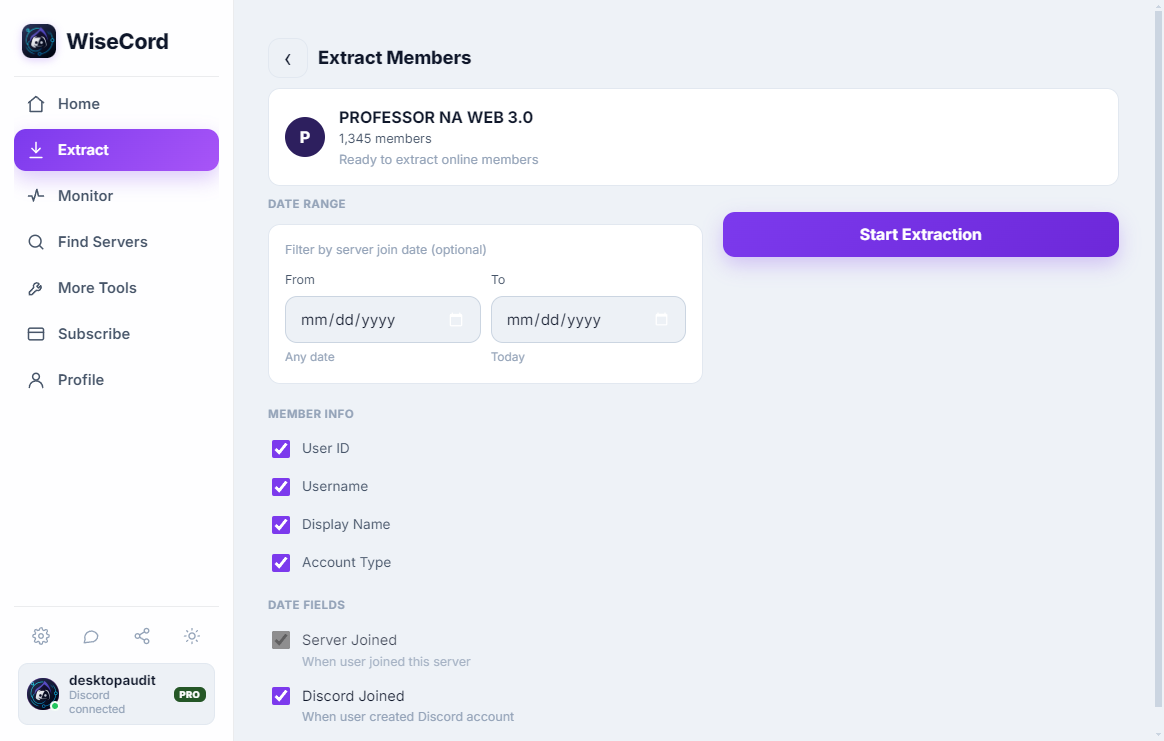
- Tap "Extract Members." WiseCord begins paging through the visible member list at a safe rate. On a small server this is quick; on a very large one, expect it to run for a while — that's the rate limiting doing its job.
- Watch the progress as members are collected. You don't need to babysit it; large exports simply take longer.
- Export to Excel or CSV, or one-tap copy usernames if you just need a quick list. The file includes username, user ID, nickname, roles, join date, and account-creation date.
For a screenshot-by-screenshot walkthrough aimed specifically at the spreadsheet output, see our guide on exporting a Discord member list to Excel.
Frequently asked questions
Can extracting members get my Discord account banned?
The risky behavior Discord penalizes is automated, bot-like activity — bots and scripts that fire requests far faster than a human would. WiseCord is designed to work within normal client behavior and includes a deliberately unhurried pace to keep your traffic reasonable, which is why it pauses and paces on large servers instead of blasting requests. No tool can offer an absolute guarantee, so the safest posture is to use the built-in limits as intended and avoid anything marketing itself as a way to bypass Discord's protections.
Why is my exported list smaller than the server's member count?
Because Discord only shows your client the members it decides to load — prioritizing online and recently-active users — no client-side tool can see every offline account on a large server on demand. Your export reflects the members visible to your account at extraction time. Running during peak activity and letting the process finish gives you the fullest list possible.
What data is included in the export?
Each WiseCord export includes username, user ID, nickname, roles, join date, and account-creation date, delivered as Excel (.xlsx) or CSV. You can also one-tap copy just the usernames when you need a quick list rather than a full spreadsheet.
Do I need the Pro plan just to extract members?
Member export is core functionality, and there's a free trial so you can try the flow before committing. Pro adds capabilities around ongoing monitoring — 24/7 Cloud Monitoring that keeps tracking joins even when the app is closed, plus message search — which matters if you're combining one-off extraction with continuous tracking. You can compare what's included on the pricing page.
Is WiseCord available on iPhone or desktop?
WiseCord runs on Windows, macOS and Android, installed via a direct APK download rather than the Play Store; a VirusTotal scan is linked on the download page so you can verify the file before installing. There's no iOS or desktop build today, so extraction happens from your Android device.
Is extracting member data legal?
You're reading data that's already visible to your own account in servers you've joined, which is different from breaking into anything. That said, "visible to you" is not the same as "yours to broadcast." Keep it to legitimate community purposes — analytics, backups, opt-in outreach — handle the data privately, and follow Discord's Terms and your local privacy rules. This article is practical guidance, not legal advice.
Putting it together
Member extraction is a genuinely useful operations tool when you treat it as one: pull data you have a reason to analyze, accept the visibility limit instead of fighting it, let the a deliberately unhurried pace keep your account safe, and use the resulting spreadsheet for reporting and moderation rather than spam. Do that consistently and you'll get clean, dated snapshots that actually tell you how your community is changing. Ready to try it on your own servers? Download WiseCord and start with a single export to see the fields for yourself.