WiseCord
How to Find & Discover New Discord Servers in Your Niche

To find new Discord servers in your niche, combine four sources: Discord's own Explore tab, third-party directories like Disboard and Top.gg, communities linked from social platforms (Reddit, X, YouTube, Twitch), and WiseCord's in-app server discovery, which lets you browse Discord servers by category from your phone. Cross-checking these sources surfaces active communities you would never see from any single one. This guide is for community managers, marketers, and researchers who need to find real, active servers, not just the biggest ones.
Why finding the right servers matters
Discord hosts millions of communities, but the ones worth your time are the active, on-topic ones, not simply the largest. If you run a crypto signals group, a coaching business, or a sports-picks community, the servers you join shape who you meet, what trends you spot early, and where your future members are already hanging out. The goal isn't to collect server invites; it's to find communities where your niche is genuinely active so you can research, network, or (respectfully) grow.
People search for new servers for a few recurring reasons:
- Networking: connect with operators and members who share your focus.
- Market research: see how competitors run their channels, price, and moderate.
- Lead generation: understand where your potential members already gather.
- Learning: join communities in your field to keep up with tools and trends.
The main ways to discover Discord servers
Each discovery method has a different strength. Some surface polished, high-traffic servers; others surface small but fast-moving niche communities. Here's an honest comparison so you can pick the right mix.
| Method | Best for | Limitations |
|---|---|---|
| Discord Explore | Verified, large, well-moderated servers by category | Skews toward big communities; smaller niche servers rarely appear |
| Directories (Disboard, Discord.me, Top.gg) | Keyword and tag search across many niches | Listings can be stale or bumped for visibility; quality varies |
| Social media (Reddit, X, YouTube, Twitch) | Finding active communities tied to a creator or topic | Manual; invites expire; requires digging through posts and panels |
| WiseCord discovery | Browsing servers by category on Android, then monitoring the ones you join | Android app; discovery covers listed categories, not every private server |
Method 1: WiseCord's server discovery
If you already use WiseCord to monitor communities, its built-in discovery keeps everything in one place on your phone. Open the app, go to Server Discovery, and browse by category or search for keywords relevant to your niche. Because WiseCord is built for community operators, the natural next step after finding a server is monitoring it: once you join, you can add it to WiseCord and get real-time join alerts whenever someone new arrives, so you notice which communities are actually growing rather than sitting dormant.
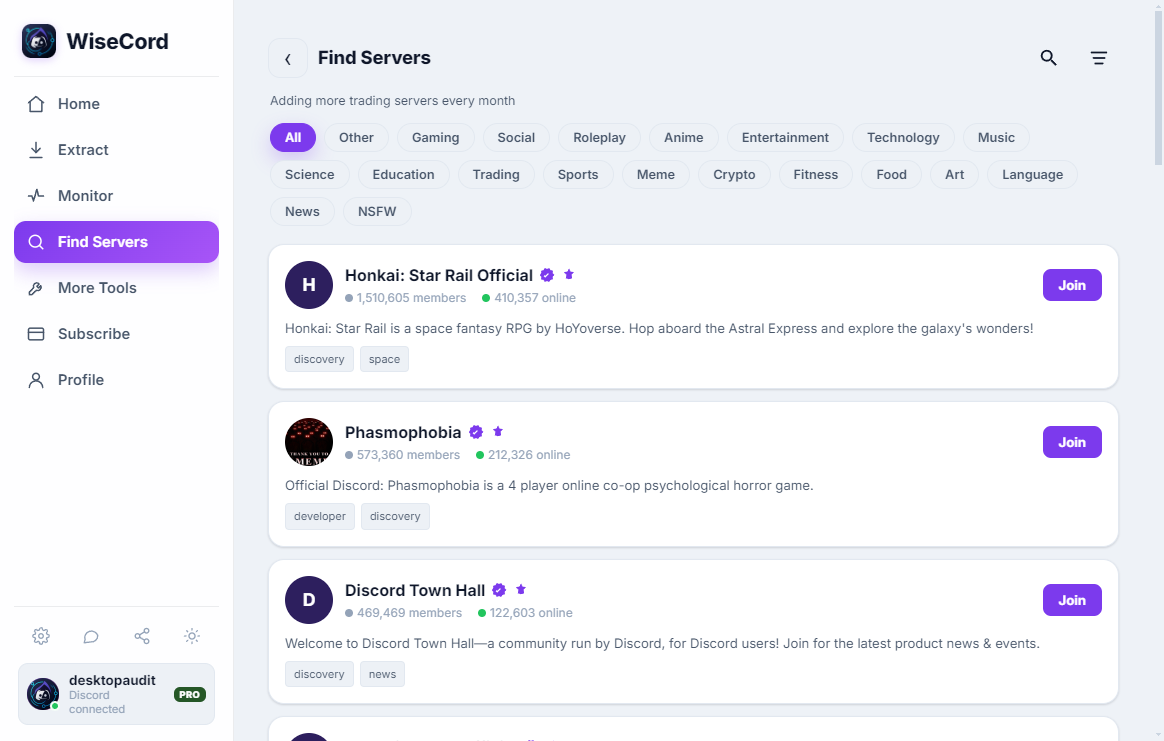
This matters because member count alone is a weak signal. A server with 40,000 members and no recent joins is coasting; a 2,000-member server gaining people daily is where the energy is. Watching join activity over a few days tells you far more than a single snapshot. For a deeper walkthrough of the feature, see our guide on using WiseCord's server discovery.
Method 2: Discord's official Explore tab
Discord's own discovery lives in the Explore section, available on desktop and mobile. It lists verified and eligible servers grouped by category (gaming, science, education, and so on) and lets you search. The upside is trust: these servers meet Discord's community standards and tend to be well moderated. The downside is bias toward scale. Explore is designed to showcase large communities, so the smaller, hyper-focused servers that are often the most valuable for niche research simply don't surface here. Treat Explore as a starting point, not the whole map.
Method 3: Third-party server directories
Directory sites index tens of thousands of public servers and let you search by keyword or tag. The best-known are:
- Disboard: the largest directory; strong tag-based search and a bump system that surfaces recently active servers.
- Discord.me: long-running listing site with category browsing.
- Top.gg: known mainly for bots, but also lists servers.
Directories are excellent for casting a wide net across a niche. Just verify before you commit: a server can be listed and still be inactive, because owners "bump" listings for visibility regardless of how alive the community is. Open the invite, glance at the channels, and check whether people are actually talking today.
Method 4: Social media and creator communities
Some of the most active niche servers are never listed anywhere; they're linked from the platforms where their audience already lives. Look for Discord invites in:
- Reddit: subreddit sidebars and pinned posts, plus community wikis.
- X (Twitter): creator bios and pinned tweets.
- YouTube: channel descriptions and pinned comments.
- Twitch: the panels below a streamer's video.
This method is manual, but it reliably finds communities tied to a specific creator or topic, exactly the kind of engaged, on-brand server that directories miss. Keep a running list of invites as you find them so you can evaluate them in a batch.
How to evaluate a server before you commit
Finding servers is easy; finding good ones takes a quick check. Before you invest time, look at:
- Online-to-total ratio: a healthy community usually has a solid share of members online at once. A huge total with almost nobody online is a red flag.
- Recent activity: open a couple of main channels and check the timestamp on the last message. Minutes or hours is good; weeks is not.
- Clear purpose and structure: organized channels, visible rules, and active moderation signal a community that's actually run, not abandoned.
- Sustained growth: after joining, monitoring join activity over a few days shows whether the server is growing or stalling, which a single visit can't reveal.
Keep in mind that member data you can see is always limited to what your own account has access to. Discord surfaces online and recent members by default, and larger servers reveal their full membership more slowly. WiseCord respects those same boundaries, extracting only what's visible to your account and pacing its work with a deliberately unhurried pace for account safety.
After you find good servers: turn discovery into a system
Discovery isn't a one-time task. Niches shift, new servers launch, and old ones fade. The operators who stay ahead treat it as an ongoing habit:
- Add the servers worth watching to WiseCord and set up join alerts so you're notified when they gain momentum.
- If you follow several communities at once, our guide to monitoring multiple Discord servers shows how to keep them all in one view without checking each app manually.
- Revisit your list monthly, drop the servers that went quiet, and add fresh finds from your directory and social-media sweeps.
- For more field-tested discovery tactics, see our server discovery tips.
Above all, engage authentically. The point of finding communities is to become a genuine part of them, not to spam invites. Servers that catch on to self-promotion remove people fast, and word travels in tight niches.
Frequently asked questions
What is the fastest way to find niche Discord servers?
Search a directory like Disboard with the exact tags for your niche, then cross-check the results against social media (Reddit sidebars, creator bios, Twitch panels) to catch active servers that aren't listed anywhere. Combining a directory with social sources gives you both breadth and freshness in a single sitting.
Is it against Discord's rules to find and join lots of servers?
Joining public servers you're invited to is normal use of Discord. What matters is how you behave once inside: follow each server's rules, don't mass-DM or spam invites, and engage genuinely. WiseCord is built to work within normal client behavior and includes rate limiting to keep your account acting like a regular user rather than hammering Discord.
Can I see how active a server is before joining?
Partly. Directories and Discord Explore show member counts and sometimes online counts, which hint at activity but can be misleading. The reliable signal comes after you join, when you can read channel timestamps and, with WiseCord, watch real-time join alerts over a few days to see whether the community is actually growing.
Do I need WiseCord to discover Discord servers?
No. Discord Explore, directories, and social media are all free and require no extra tools. WiseCord adds value once you've found servers worth following: it lets you browse by category in-app and, more importantly, monitor the communities you join with join alerts and member export, turning one-off discovery into ongoing tracking. You can compare what's free versus Pro on the pricing page.
Is WiseCord available on iPhone?
WiseCord runs on Windows, macOS and Android, installed via a direct APK download rather than the Play Store; a VirusTotal scan is linked on the download page for peace of mind. There is no iOS version at this time. If you're on Android, see how it works before you install.
What data can WiseCord pull from a server I join?
WiseCord can export the members visible to your account, with fields like username, user ID, nickname, roles, join date, and account-creation date, to Excel or CSV. It only sees what Discord already shows your account, and large servers reveal their full membership gradually because extraction is paced for safety.
Conclusion
Finding the right Discord servers takes a bit of effort, but a simple system makes it repeatable: sweep directories and social media for candidates, verify activity before you join, and monitor the keepers so you notice which communities are actually growing. WiseCord ties the last step together by letting you browse servers by category and then track the ones that matter. Ready to start? Download WiseCord and turn scattered discovery into an organized, ongoing habit.