WiseCord
How to Monitor Multiple Discord Servers at Once

Part of the Discord tracker guide
This article is one chapter. The full picture, with the product walkthrough and the comparison table, is on the Discord tracker page.
To monitor multiple Discord servers at once, set each server you care about as a monitored server in WiseCord, turn on real-time join alerts, and enable 24/7 Cloud Monitoring so tracking continues even when the app is closed. Instead of manually opening each community, you get one stream of push notifications the moment someone joins any monitored server. This guide is for community operators and managers who run or watch more than a handful of servers.
Why manual multi-server monitoring falls apart
Watching one Discord server is easy. Watching ten is a different job. If you run paid signal groups, coaching communities, or a portfolio of client servers, the manual approach breaks down fast because Discord was designed for members, not operators:
- Context-switching tax: Every server you open pulls you out of whatever else you were doing. Ten servers means ten interruptions to check on a single question like "did anyone new join today?"
- Missed events: Joins, especially the ones that matter (a paying subscriber, a competitor's growth spike), happen while you're asleep or away. Scroll far enough back and Discord's member list becomes useless for spotting who is actually new.
- No memory: Discord doesn't hand you a clean, timestamped log of who joined which server and when. You end up screenshotting or keeping a spreadsheet by hand.
- Notification fatigue: Turning on every server's native notifications buries the signal (a new join) under the noise (every message, reaction, and @everyone).
The fix isn't more discipline. It's shifting from pulling information out of each server manually to having the important events pushed to you from all of them at once. That's what purpose-built monitoring does, and it's the core idea behind Discord server monitoring in general.
What "monitoring multiple servers" actually means in WiseCord
WiseCord runs on Windows, macOS and Android built for the operator's side of Discord. When people talk about monitoring several servers with it, they usually mean a combination of a few real features working together:
- Real-time join alerts: A push notification the moment someone joins a server you've flagged for monitoring. Add as many servers as you want to watch, and the alerts arrive in one place on your phone.
- 24/7 Cloud Monitoring (Pro): Tracking that keeps running on the server side, so joins are still recorded even when the app is closed or your phone is off. This is the piece that makes watching many servers realistic, since you're not depending on keeping an app open.
- Member export: For any monitored server, pull the member list into Excel (.xlsx) or CSV, or one-tap copy usernames, when you need the full roster rather than just a live feed.
- Server discovery: Browse and find Discord servers by category, which is handy when part of "monitoring" is keeping an eye on new communities in your niche.
WiseCord surfaces the members and joins that are visible to your own Discord account on each server. It works within normal client behavior and applies a deliberately unhurried pace for account safety, which also means very large servers take longer to work through. It's an honest constraint worth setting expectations around before you scale up to dozens of servers.
How to set up multi-server monitoring, step by step
Step 1: Install WiseCord and sign in
WiseCord is desktop and Android and distributed as a direct APK rather than through the Play Store, with a VirusTotal scan linked on the download page if you want to verify the file first. Install it, open it, and connect the Discord account that can already see the servers you want to watch. You can only monitor communities your account is a member of, so make sure you've joined each target server in Discord normally.
Step 2: Add each server you want to monitor
Go through your servers and mark the ones worth tracking. Don't monitor everything, monitor what matters. In practice, that tends to fall into three buckets:

- Servers you own or manage, where new joins are revenue or engagement signals.
- Client or partner servers you're responsible for reporting on.
- Competitor or research servers you want to keep a passive eye on.
Being selective here is the single biggest lever for keeping the notification stream useful. Twelve carefully chosen servers produce a readable feed. Fifty produce noise.
Step 3: Turn on real-time join alerts
Enable join alerts for each monitored server so you receive a push notification when someone new arrives. Because every alert lands in the same notification stream, you effectively get a combined "who just joined, anywhere" view without opening a single server. If you want a deeper walkthrough of the alert setup itself, see our guide on setting up Discord server alerts.

Step 4: Enable 24/7 Cloud Monitoring for always-on coverage
This is the step that turns "I check a few servers when I remember" into genuine multi-server monitoring. Cloud Monitoring, part of the Pro plan, keeps tracking joins from the cloud, so nothing is missed while your phone is locked, offline, or restarting. For someone watching several communities across different time zones, this is the difference between a real log and a feed with gaps in it. We cover how it works in detail in cloud monitoring explained.

Step 5: Export member lists when you need the full picture
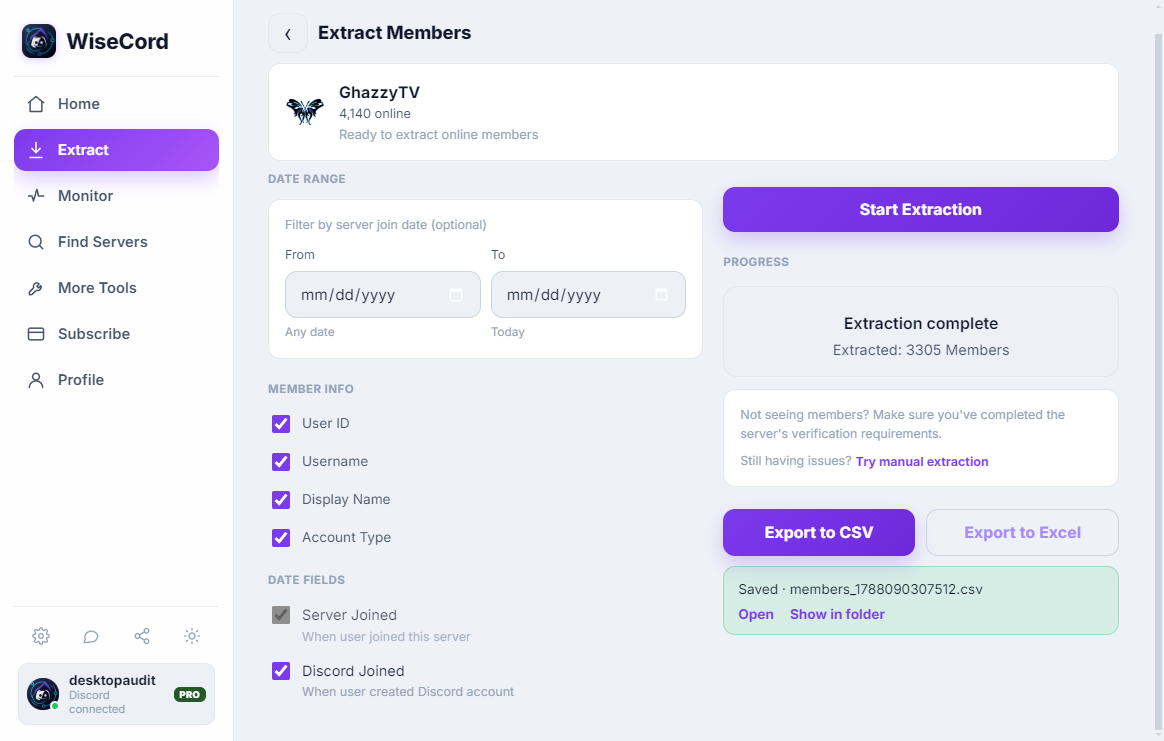
Live alerts tell you about change. Sometimes you need the whole roster, for a client report, an audit, or a re-engagement campaign. From any monitored server you can export the member list to Excel or CSV, including fields like username, user ID, nickname, roles, join date, and account-creation date. Expect Discord to surface online and recently active members by default, and expect larger servers to take longer because of the safety-first rate limiting.
Comparing the ways to watch many servers at once
There's more than one way to keep tabs on several Discord communities. Here's an honest look at the trade-offs.
| Approach | Strengths | Limitations |
|---|---|---|
| Manually switching servers | Free; no setup; full context inside each server | Doesn't scale; misses events while away; no clean join log |
| Discord's native notifications | Built in; immediate for messages you're mentioned in | No dedicated join alerts; buries signal under chat noise; no export |
| Discord bots | Powerful for servers you own and can add a bot to | Requires admin rights per server; can't watch servers you don't control; setup overhead |
| WiseCord (alerts + cloud monitoring) | One combined join feed across many servers; keeps tracking 24/7; member export; works on servers you're a member of | Android only; cloud monitoring is a Pro feature; sees only what your account can see |
For a wider survey of options, our roundup of the best Discord monitoring tools puts these approaches side by side in more depth.
Best practices for managing many servers
- Prune your monitored list regularly. Review it roughly once a month and drop servers you no longer need to watch. A lean list keeps alerts meaningful.
- Group servers mentally by purpose. Think in terms of "mine," "clients," and "research." That framing helps you decide which servers genuinely need real-time alerts and which you only export from occasionally.
- Lean on Cloud Monitoring for anything time-sensitive. If missing a join would cost you money (a paying subscriber, a time-limited promo), that server belongs on always-on cloud tracking rather than app-open-only checking.
- Export before big changes. Pull a member snapshot before a relaunch, price change, or migration so you have a clean baseline to compare against later. The same habit underpins good activity tracking.
- Respect the rate limits. The safety-first pacing exists to keep your account healthy. Don't try to force everything at once, especially across many large servers on the same day.
Frequently asked questions
How many Discord servers can I monitor at once?
You can add multiple servers to monitor, and with 24/7 Cloud Monitoring on the Pro plan the tracking keeps running across all of them even when the app is closed. The practical ceiling is less about a hard number and more about the safety-first rate limiting, so very large or numerous servers simply take longer to process rather than being blocked.
Will monitoring lots of servers get my Discord account banned?
WiseCord is built to operate within normal client behavior and includes a deliberately unhurried pace specifically to protect your account. There's no way to guarantee any third-party tool is risk-free, so the sensible approach is to use it at a reasonable pace, avoid hammering many large servers simultaneously, and read our account safety tips before scaling up.
What data can I actually see across my monitored servers?
You see what your own Discord account can see on each server. Join alerts fire when someone new joins a monitored server, and member exports include username, user ID, nickname, roles, join date, and account-creation date. Keep in mind Discord shows online and recently active members by default, so a snapshot reflects visible members rather than a guaranteed full roster.
Do I need Pro to monitor multiple servers?
Real-time join alerts let you watch several servers, but the always-on piece, 24/7 Cloud Monitoring that keeps tracking when the app is closed or your phone is off, is a Pro feature. Plans start at Basic ($16/mo) and Pro ($25/mo), with discounted 6-month ($105) and 1-year ($185) Pro options and a free trial. See pricing for the current breakdown.
Is WiseCord available on iPhone or desktop?
WiseCord runs on Windows, macOS and Android, distributed as a direct APK download rather than through the Play Store. There's a VirusTotal scan linked on the download page so you can verify the file before installing. There's no iOS or desktop build at this time.
Can I monitor servers I don't own or manage?
You can monitor any server your account is a member of, including research or competitor communities you've joined normally, because monitoring reflects what your account can already see. You do not need admin rights or the ability to add a bot, which is the main limitation of bot-based approaches.
The bottom line
Monitoring many Discord servers at once isn't about willpower or opening more tabs. It's about flipping from manual checking to pushed alerts, then letting cloud monitoring keep the log complete around the clock. Mark the servers that matter, turn on join alerts, enable 24/7 Cloud Monitoring for anything time-sensitive, and export member lists when you need the full picture. If you're just getting started, our getting started guide walks through the basics, or you can download WiseCord and set up your first few monitored servers today.